
Left/Right
Delimiter matching.
The lr function allows you to match two delimiters and scale them with the content they contain. While this also happens automatically for delimiters that match syntactically, lr allows you to match two arbitrary delimiters and control their size exactly. Apart from the lr function, Typst provides a few more functions that create delimiter pairings for absolute, ceiled, and floored values as well as norms.
To prevent a delimiter from being matched by Typst, and thus auto-scaled, escape it with a backslash. To instead disable auto-scaling completely, use set math.lr(size: 1em).
Example
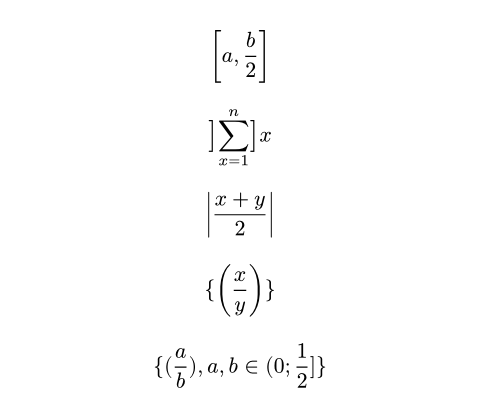
$ [a, b/2] $
$ lr(]sum_(x=1)^n], size: #50%) x $
$ abs((x + y) / 2) $
$ \{ (x / y) \} $
#set math.lr(size: 1em)
$ { (a / b), a, b in (0; 1/2] } $
函数
lr元素自始可用
Scales delimiters.
While matched delimiters scale by default, this can be used to scale unmatched delimiters and to control the delimiter scaling more precisely.
size默认值:100% + 0pt
The size of the brackets, relative to the height of the wrapped content.
body
The delimited content, including the delimiters.
mid元素0.10.0起可用
Scales delimiters vertically to the nearest surrounding lr() group.
 展开示例
展开示例
$ { x mid(|) sum_(i=1)^n w_i abs(f_i (x)) < 1 } $

body
The content to be scaled.
abs自始可用
Takes the absolute value of an expression.
展开示例
$ abs(x/2) $

size
The size of the brackets, relative to the height of the wrapped content.
Default: The current value of lr.size.
body
The expression to take the absolute value of.
norm自始可用
Takes the norm of an expression.
展开示例
$ norm(x/2) $

size
The size of the brackets, relative to the height of the wrapped content.
Default: The current value of lr.size.
body
The expression to take the norm of.
floor自始可用
Floors an expression.
展开示例
$ floor(x/2) $

size
The size of the brackets, relative to the height of the wrapped content.
Default: The current value of lr.size.
body
The expression to floor.
ceil自始可用
Ceils an expression.
展开示例
$ ceil(x/2) $

size
The size of the brackets, relative to the height of the wrapped content.
Default: The current value of lr.size.
body
The expression to ceil.
round自始可用
Rounds an expression.
展开示例
$ round(x/2) $

size
The size of the brackets, relative to the height of the wrapped content.
Default: The current value of lr.size.
body
The expression to round.